Drawing References
Monitor how well drawing numbers printed on drawings are linked to other drawings in the Rift viewer, find numbers that match no drawing, and set the labels Lunr ignores when matching.
Overview
Where drawing references are enabled, Lunr reads the drawing numbers printed on each drawing and links them to the drawings they name. Users see these links as hotspots in the Rift viewer and in the Related view of a document. The Drawing References page reports how well the matching is working.
Select Drawing References in the Content settings group of the admin main menu. The page requires the Administration Pages access right.
Enabling Drawing References
Drawing references are disabled by default. Enable Link Drawing References in Rift in the Document tab of General Settings. Until it is enabled, the Drawing References page asks you to enable it and offers Open Document Settings.
New and updated drawings are scanned as they are processed. Enabling the setting does not scan drawings already in Lunr. Run a scan from Data Tools when you are ready.
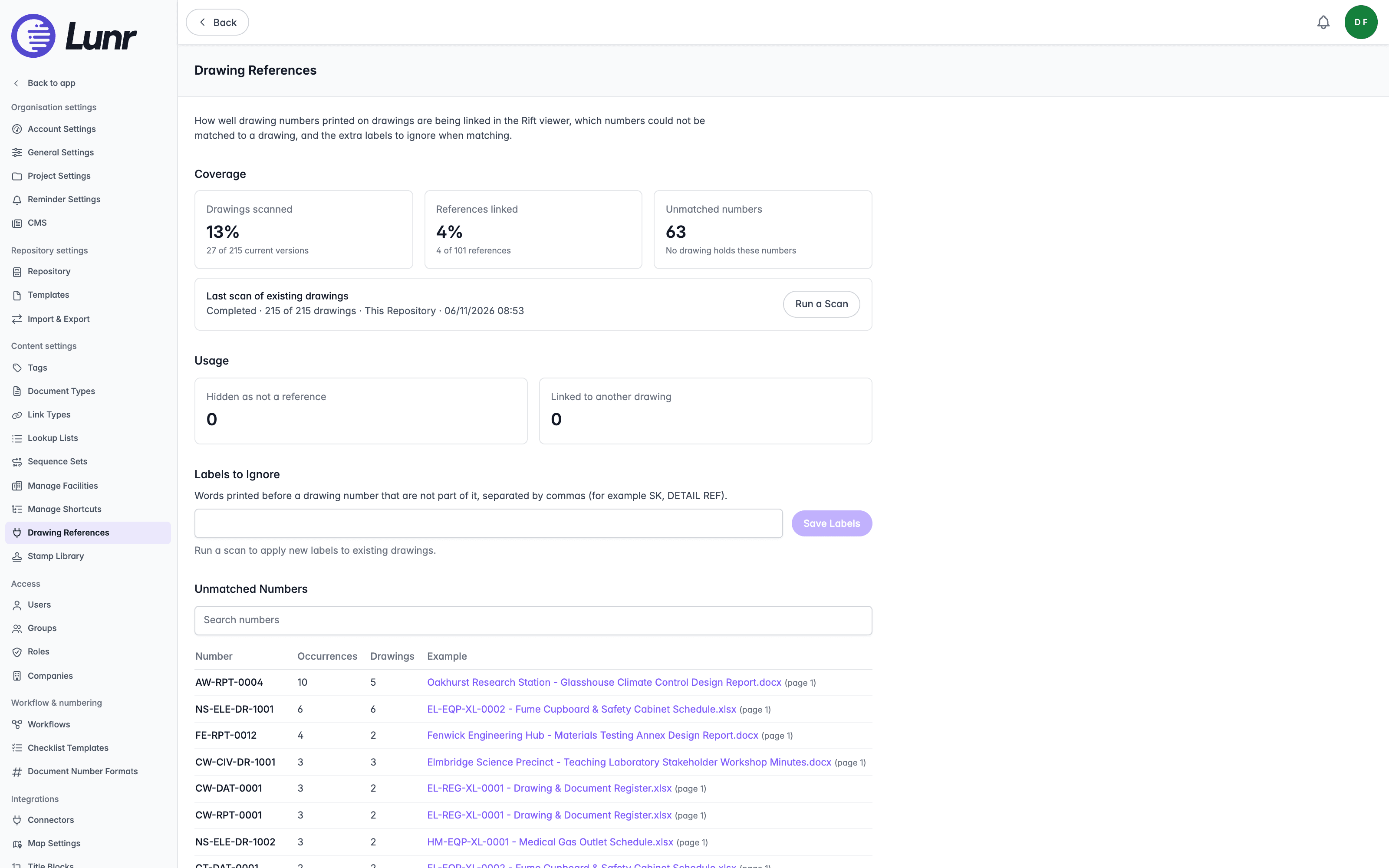
Coverage
Coverage shows three figures.
| Figure | What it shows |
|---|---|
| Drawings scanned | The share of current versions that have been scanned. |
| References linked | The share of detected references that match a drawing. |
| Unmatched numbers | The count of numbers that no drawing holds. |
Last scan of existing drawings shows the most recent run. Where a drawing number format has appeared that earlier scans did not know, the page reports it and recommends a scan. Select Run a Scan to open the Drawing Reference Scan tool.
Usage
Usage shows how many references users have hidden as Hidden as not a reference, and how many they have pointed at a different drawing as Linked to another drawing.
Labels to Ignore
Words printed before a drawing number that are not part of it, such as SK or DETAIL REF, can be excluded from matching. Enter them in the field, separated by commas, then select Save Labels. Run a scan to apply new labels to existing drawings.
Unmatched Numbers
Unmatched Numbers lists the numbers that no drawing holds, with Number, Occurrences, Drawings, and Example columns. Use the Search numbers field to find one.
Manage Shortcuts
Define saved, tag-based virtual folder hierarchies that let users browse documents by metadata such as discipline or building, instead of the physical project and folder structure.
Stamp Library
Manage the organisation's shared library of SVG stamps used in the PDF (PDFTron) and Rift viewers, including uploads, groups, stamp details, CSV metadata import, and the Rift library size limits.