Project Settings
Per-project configuration covering the project form, RFI, Change Request, Drawing Number Request, Checklist, Workflow, Download, Transmittal, and Dashboard & Navigation settings.
Overview
The Project Settings section lets administrators standardise how projects are created and managed across the tenant. It requires the Administration Pages access right.
Project defaults can be configured to automatically apply predefined settings such as document types, workflows, access controls, metadata values, folder structures, and naming conventions when a project is created. This ensures consistency, reduces manual configuration effort, and helps enforce governance and compliance requirements from the outset.
Default behaviours also provide a predictable baseline that users can work within, while still allowing controlled exceptions where required. Careful definition of project defaults is particularly important in environments with a high volume of projects, as it improves scalability, reduces configuration errors, and keeps projects aligned with organisational standards from creation through to closure.
These settings apply per project. For settings that apply to every user and every project in the tenant instead, see General Settings.
Project Form
Project Form controls which fields appear on the project create and edit form, whether they are required, and a handful of related project-level feature toggles.
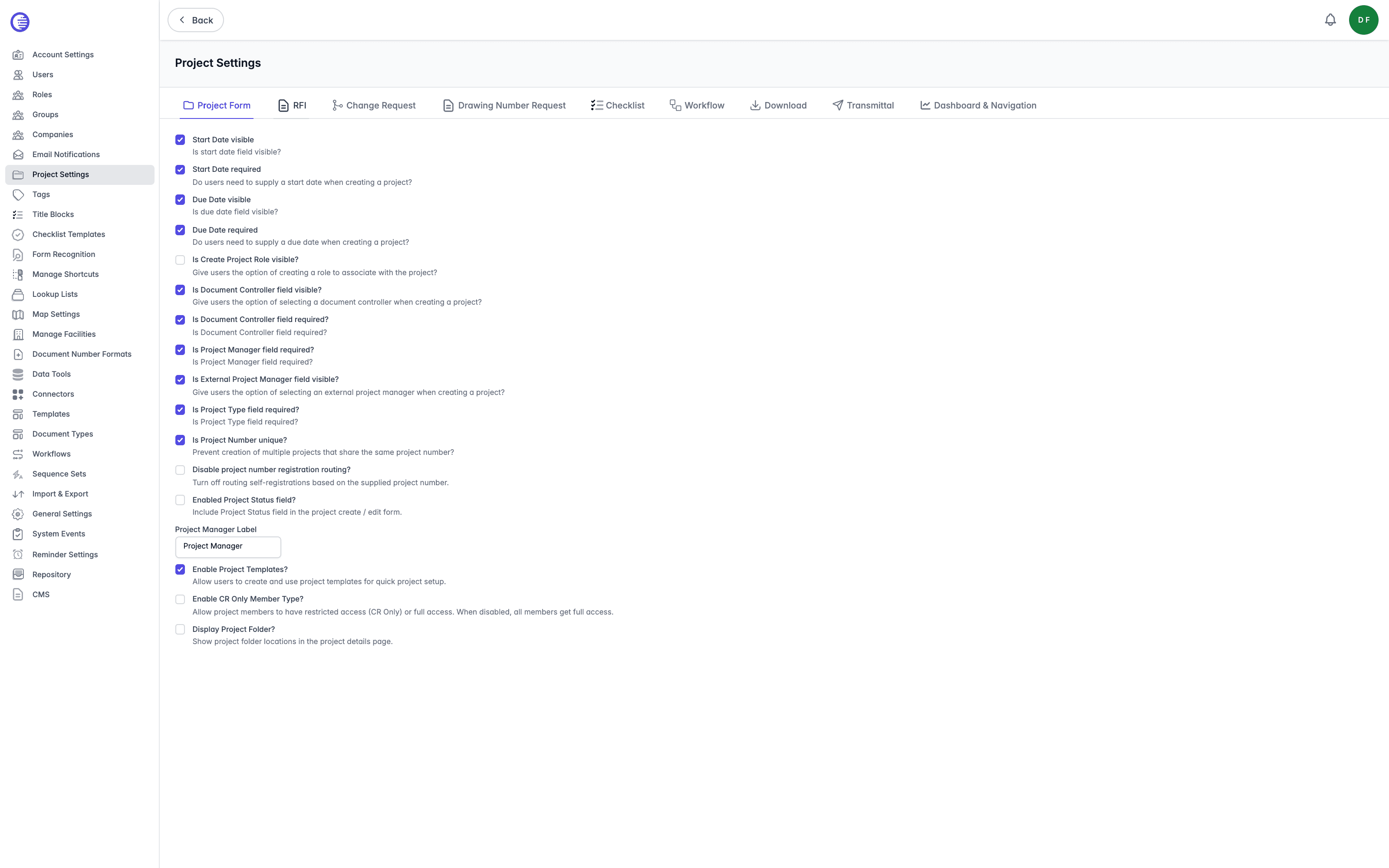
| Setting | What it controls |
|---|---|
| Start Date visible / Start Date required | Show the Start Date field on the project form, and whether users must supply a value when creating a project. |
| Due Date visible / Due Date required | Show the Due Date field on the project form, and whether users must supply a value when creating a project. |
| Is Create Project Role visible? | Give users the option of creating a role to associate with the project. |
| Is Document Controller field visible? / Is Document Controller field required? | Show the Document Controller field on the project form, and whether a value is required. |
| Is Project Manager field required? | Require a value in the Project Manager field. |
| Is External Project Manager field visible? | Give users the option of selecting an external project manager when creating a project. |
| Is Project Type field required? | Require a value in the Project Type field. |
| Is Project Number unique? | Prevent creation of multiple projects that share the same project number. |
| Disable project number registration routing? | Turn off routing self-registrations based on the supplied project number. |
| Enabled Project Status field? | Include the Project Status field on the project create and edit form. |
| Project Manager Label | Rename the Project Manager field throughout the project UI, so an organisation can call the role whatever it calls it internally. |
| Enable Project Templates? | Turn on project templates, letting users create and use templates for quick project setup. |
| Enable CR Only Member Type? | Allow project members to have restricted (CR Only) access instead of full access. When disabled, every member gets full access. |
| Display Project Folder? | Show project folder locations on the project details page. |
Not an access right
Document Controller here is a field on the project form, not an access right. There is no Document Controller access right in Lunr.
RFI
RFI controls whether RFIs are enabled for projects, and how they are labelled and displayed.
| Setting | What it controls |
|---|---|
| Is RFI Enabled? | Allow users to create RFIs in Lunr. |
| RFI Label | Rename "RFI" throughout the project UI. This is why the user guide says RFIs can appear labelled with an organisation's own wording. |
| RFI Description Note | Multi-line help text shown alongside the RFI description field. |
| Show 'Create' Menu in the Repository view? | Allow users to create or upload documents directly into the repository. Despite sitting on the RFI tab, this setting governs document creation rather than RFIs. |
| Table Columns | JSON configuration of the columns shown in the RFI table. |
Change Request
Change Request is the largest tab, covering bulk actions, page layout, sequence numbering, reviewer behaviour, and Change Request numbering.
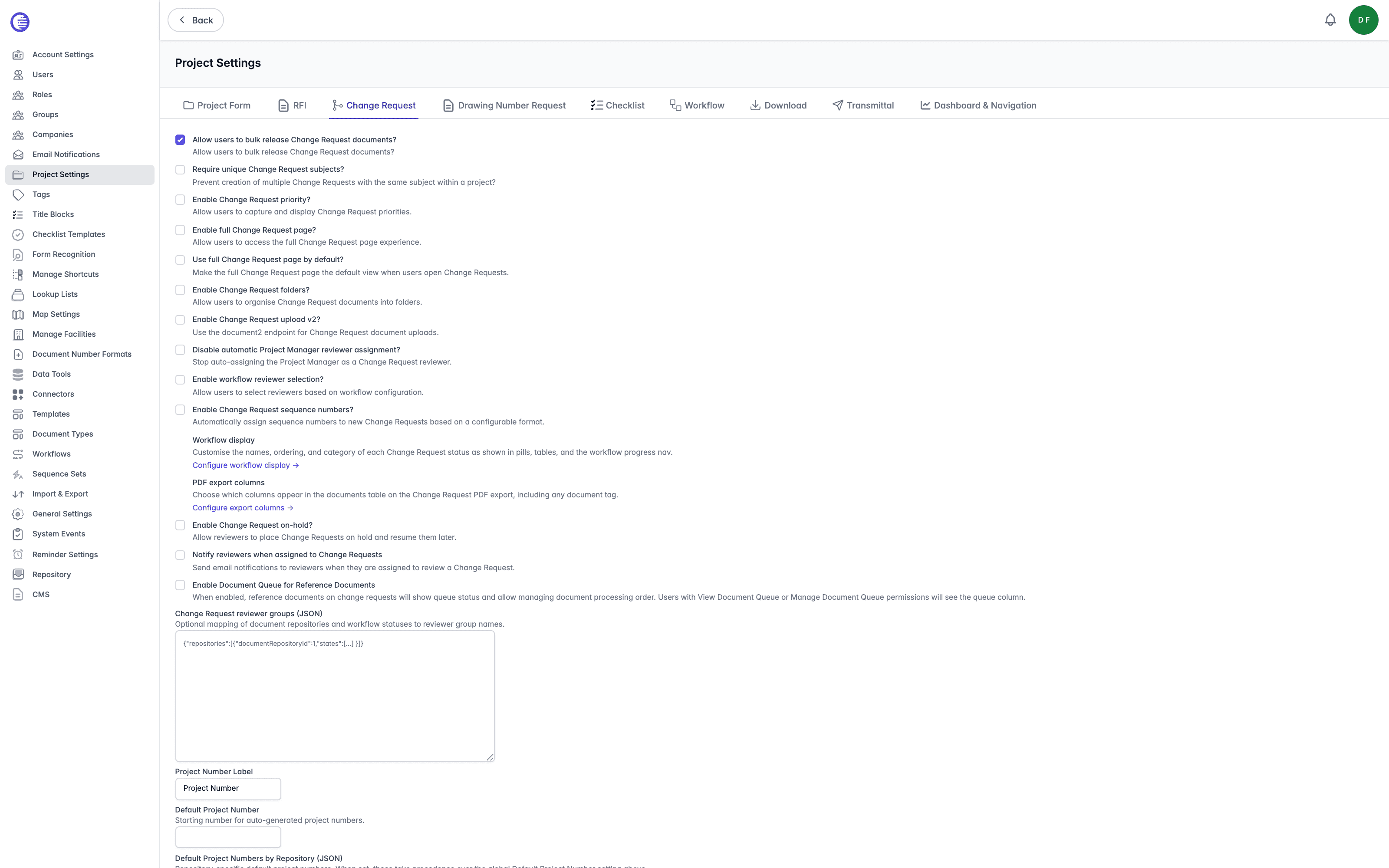
| Setting | What it controls |
|---|---|
| Allow users to bulk release Change Request documents? | Allow users to bulk release Change Request documents. |
| Require unique Change Request subjects? | Prevent creation of multiple Change Requests with the same subject within a project. |
| Enable Change Request priority? | Allow users to capture and display Change Request priorities. |
| Enable full Change Request page? | Give users the full Change Request page rather than the standard dialog-based experience. See Change Request Experiences below. |
| Use full Change Request page by default? | Make the full Change Request page the default view when users open Change Requests. Which experience applies is currently decided by Enable full Change Request page? and the repository override alone, so changing this on its own may not alter what users see. |
| Enable Change Request folders? | Allow users to organise Change Request documents into folders. |
| Enable Change Request upload v2? | Use the newer upload endpoint for Change Request document uploads. |
| Disable automatic Project Manager reviewer assignment? | Stop auto-assigning the Project Manager as a Change Request reviewer. |
| Enable workflow reviewer selection? | Allow users to select reviewers based on workflow configuration. |
| Enable Change Request sequence numbers? | Automatically assign sequence numbers to new Change Requests, based on a configurable format. |
| Enable Change Request on-hold? | Allow reviewers to place Change Requests on hold and resume them later. |
| Notify reviewers when assigned to Change Requests | Send email notifications to reviewers when they are assigned to review a Change Request. |
| Enable Document Queue for Reference Documents | Show queue status on reference documents attached to Change Requests, and allow managing document processing order. Only users with the View Document Queue or Manage Document Queue access rights see the queue column. |
| Change Request reviewer groups | Optional JSON mapping of document repositories and workflow statuses to reviewer group names. |
| Project Number Label | Rename "Project Number" throughout the project UI. |
| Default Project Number | Starting number for auto-generated project numbers. |
| Default Project Numbers by Repository | Optional JSON of repository-specific default project numbers. Where set, these take precedence over the global Default Project Number above. |
Three rows on this tab are links to separate configuration pages rather than settings you switch here:
- Configure number formats opens Change Request Number Formats, where you set the pattern new Change Request numbers follow. This row appears only once Enable Change Request sequence numbers? is enabled.
- Configure workflow display opens Change Request Workflow Display, for customising the names, ordering, and category of each Change Request status as shown in pills, tables, and the workflow progress nav.
- Configure export columns opens Change Request Export Columns, for choosing which columns appear in the documents table on the Change Request PDF export, including any document tag.
Change Request Experiences
Enable full Change Request page? chooses between the two Change Request experiences Lunr ships. It changes what users see rather than what they are allowed to do, and no data is converted either way, so an existing Change Request opens in whichever experience currently applies.
| Disabled, the standard experience | Enabled, the full page | |
|---|---|---|
| Raising a request | A dialog asking for a subject and an optional message, plus a project where the user raised it outside one | A full creation page also capturing attachments, tags, priority, due date, and reference documents |
| Tabs on a request | Documents, Comments, and History, opening on Documents | Adds Overview, which it opens on instead, and Reference Documents |
| Workflow progress nav | Not shown | Shown across the top of the request |
| The request's message | In the action pane, with an Edit action | On the Overview tab |
| Reference documents | Unavailable, including the repository's Add as Reference Documents action | Available, with allocation and bulk allocation |
Checklist joins the tabs in both experiences where checklists are enabled.
Change Requests remain fully available with the setting disabled. Users raise them from New Change Request in a project's action pane and work them through the same workflow, reviewers, releasing, and packaging.
A repository can override this
Each document repository carries its own Full Change Request page setting of Use global setting, Enabled for this repository, or Disabled for this repository, described in Repositories. The repository's value wins, so repositories in one organisation can run different experiences, and a Change Request always resolves against the repository it belongs to rather than the one the user is currently in.
Disabling this hides the Create menu entry
With Enable full Change Request page? disabled and no repository overriding it on, the Change Request entry is hidden from the Create menu across the application, including in the repository. New Change Request in a project's action pane is unaffected, so users can still raise requests, but only from inside a project.
Change Requests in the user guide covers both experiences from the user's side.
Drawing Number Request
Drawing Number Request controls how drawing number requests are approved and how many sheets a request can cover.
| Setting | What it controls |
|---|---|
| Auto-approve drawing number requests? | Approve drawing number requests automatically, without manual review. |
| Enabled new sheets option? | Allow users to add new sheets to existing drawing numbers. |
| Copy content from existing document | Allow users to copy content from an existing document, creating a linked child document. |
| Asset Id Tag Name | The tag name used to look up an asset ID for facility lookup. |
| Enable facility lookup? | Turn on facility lookup for drawing number requests. |
| Max drawing number sheets | The maximum number of sheets a single request can cover, from 1 to 99. |
Checklist
Checklist has a single master switch, Are Checklists Enabled?. It allows checklists to be attached to change requests as well as projects, and shows the checklist template library under Administration.
Disabling it hides every checklist surface tenant-wide: the checklist tabs on change requests and projects, the checklist tile on a change request's overview, and the admin Checklist Templates library itself. No existing checklist data is deleted, but the effect reaches beyond the UI: with the switch off, the checklist API refuses every request with "Checklists are not enabled for this tenant", so nothing checklist-related works anywhere in the tenant, not only what disappears from the screen.
No confirmation before disabling
Turning Are Checklists Enabled? off takes effect immediately, with no confirmation prompt, despite disabling checklists across the whole tenant.
Gates another admin area
Are Checklists Enabled? also reveals the Checklist Templates admin page, which additionally requires the Manage Checklist Templates access right. This is the clearest example on this page of one setting opening up another admin area.
Workflow
Workflow has a single setting. Only show Finalise for As Constructed? restricts the Finalise workflow action so it only appears for As Constructed documents.
Download
Download has a single setting. Enable automatic downloads (no prompt)? controls whether a downloaded file saves straight to the downloads folder or the browser asks where to put it, as described in Downloading Documents.
Transmittal
Transmittal controls the transmittal page, its layout, and the labels used on generated transmittals.
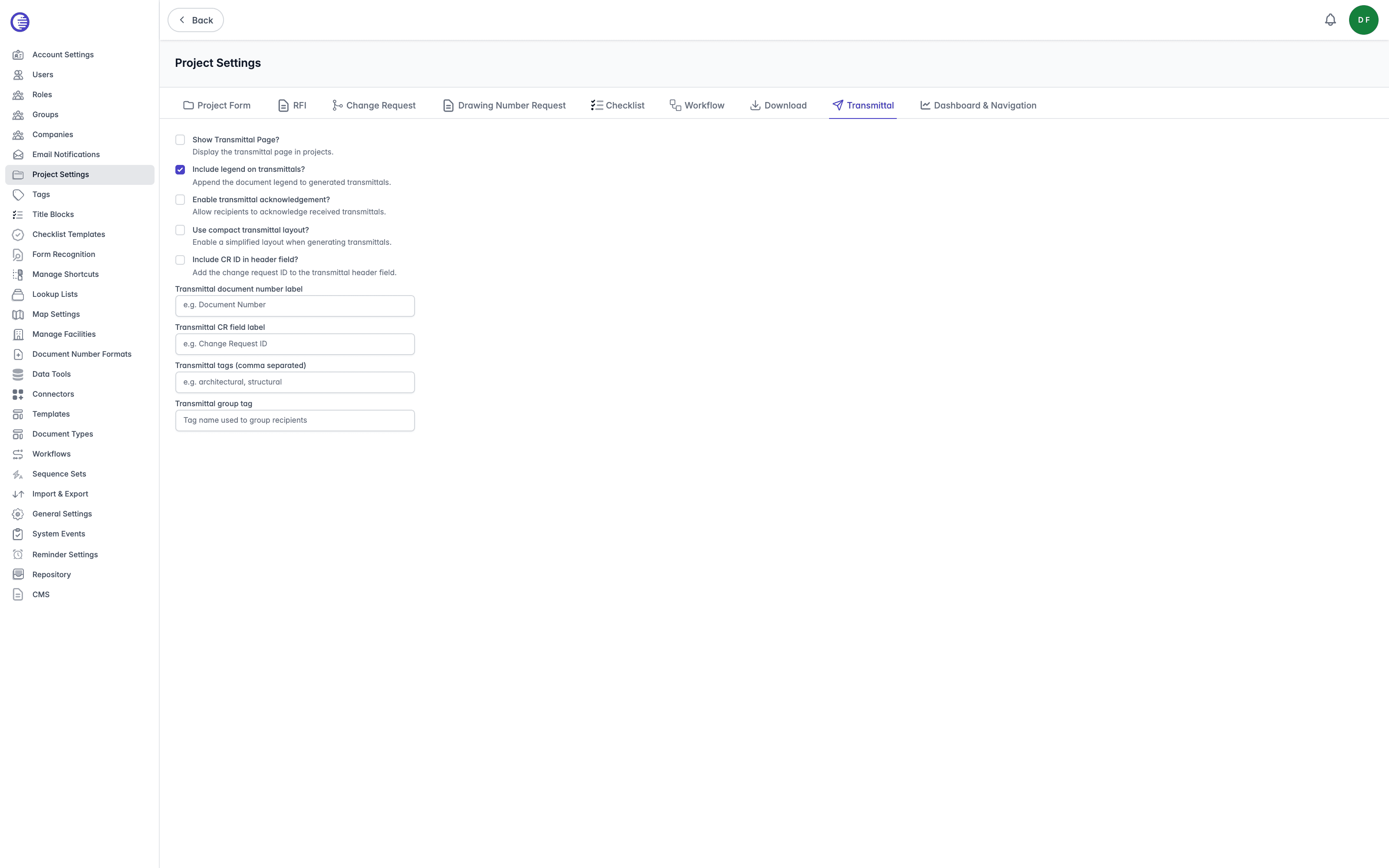
| Setting | What it controls |
|---|---|
| Show Transmittal Page? | Display the transmittal page in projects. |
| Include legend on transmittals? | Append the document legend to generated transmittals. |
| Enable transmittal acknowledgement? | Allow recipients to acknowledge received transmittals, the Acknowledge step described in Shares. |
| Use compact transmittal layout? | Use a simplified layout when generating transmittals. |
| Include CR ID in header field? | Add the Change Request ID to the transmittal header field. |
| Transmittal document number label | Rename the document number field shown on transmittals. |
| Transmittal CR field label | Rename the Change Request field shown on transmittals. |
| Transmittal tags | Comma-separated list of tags to display on transmittals. |
| Transmittal group tag | The tag name used to group recipients on a transmittal. |
Dashboard & Navigation
Dashboard & Navigation controls the project dashboard and a handful of navigation defaults.
| Setting | What it controls |
|---|---|
| Show Dashboard? | Show the project dashboard. |
| Show Change Request Page First? | Make Change Requests the first page users see when they open a project. |
| Show My Projects Only by Default? | Default the project list to showing only the projects the current user belongs to. |
| Enable enhanced project documents view? | Uses optimised endpoints for improved performance when browsing and searching project documents. |
Saves through General Settings
Enable enhanced project documents view? is the exception on this tab: it actually saves through General Settings rather than Project Settings, and if the save fails, the checkbox silently reverts with no error toast, unlike every other toggle on this page.
General Settings
Organisation-wide configuration covering site defaults, content generation, PDF stamping, Change Request import, user management, search, workflow, notification, and document viewer settings.
Change Request Number Formats
Configure the format Lunr uses to automatically assign a sequence number to new Change Requests, including its running number, tag placeholders, and padding.