Reminder Settings
Switch reminders on for the tenant, and set how many days ahead of a due date each reminder type notifies its recipients.
Overview
Select Reminder Settings in the admin main menu to open this page. Reaching it requires the Administration Pages access right.
A reminder attaches to a document, project, or Change Request and notifies chosen users ahead of a due date. This page has two parts: a single switch that turns reminders on for the tenant, and a table of the reminder types the review and approval workflow uses when it creates a reminder for you.
Enabling Reminders
Select Enable reminders to enable reminders for this tenant.
With reminders disabled:
- The document workflow does not create the automatic review and approval reminders described below.
- My Reminders does not appear in the avatar menu at the top of the main menu, so a user has no page listing their own reminders.
- The Document Reminders report does not appear on the Reports page.
Disabling reminders does not remove a user's own Create Reminders action. A user can still add a reminder to a document, project, or Change Request by hand while reminders are disabled; only the automatic workflow reminders and the two surfaces above are affected.
Reminder Types
The table lists every reminder type the workflow can use, with two columns you can edit.
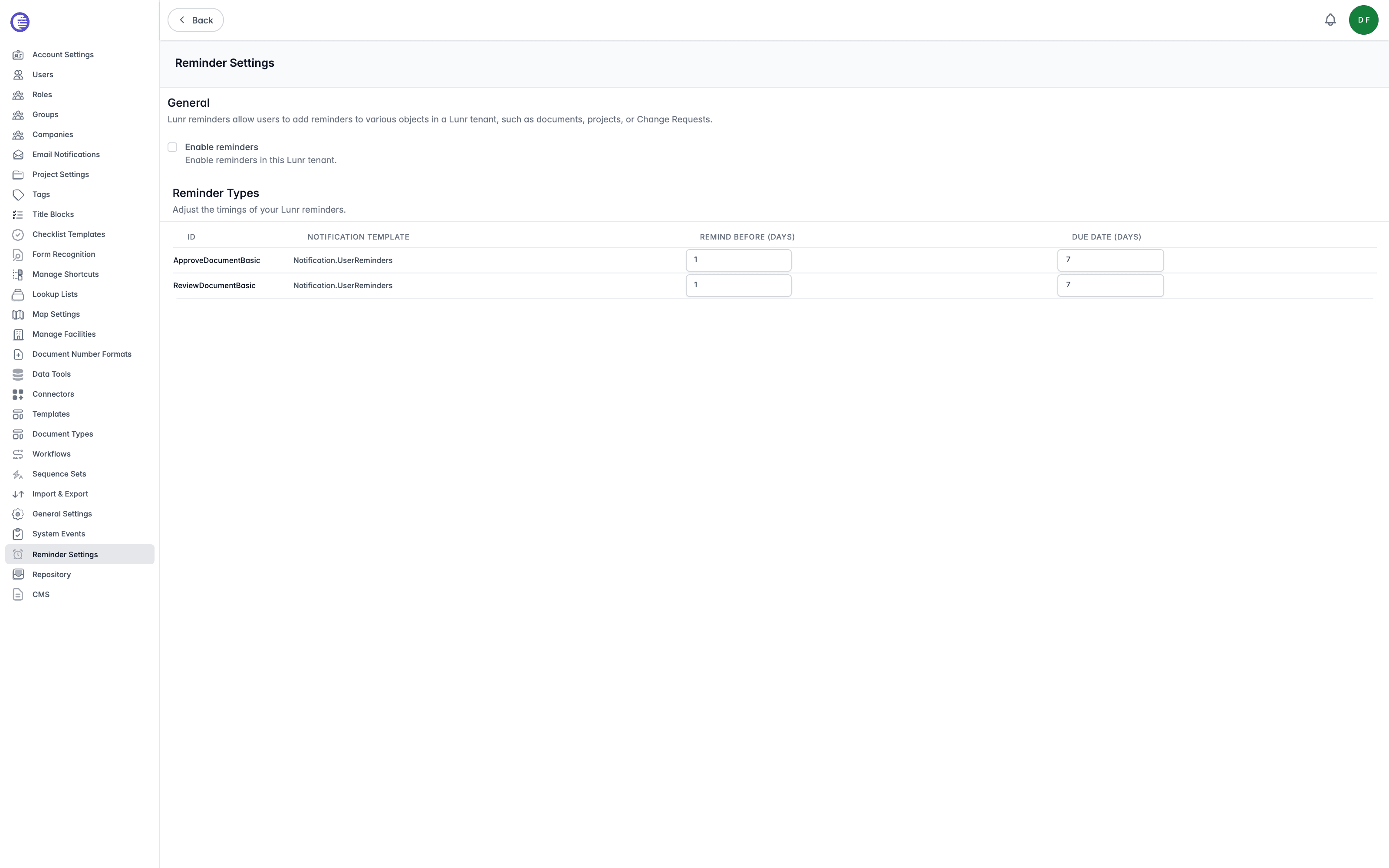
| Column | What it controls |
|---|---|
| Id | The reminder type's identifier. A tenant ships with two: ReviewDocumentBasic and ApproveDocumentBasic. |
| Notification Template | The keyword of the notification email this reminder type sends, for example Notification.UserReminders. Edit the template's subject and body on the Message Templates page. |
| Remind Before (days) | How many days before the due date the first notification is sent. |
| Due Date (days) | How many days ahead of today the due date defaults to, for a reminder created without one specified. |
Enter a new value in either day field to save it; there is no separate Save button for this table.
Where Each Type Is Used
ReviewDocumentBasic and ApproveDocumentBasic cover different points in the review and approval workflow, and only one of them can be created by hand.
ReviewDocumentBasicnotifies a document's reviewers automatically when the document is submitted for review. It is also the only reminder type a user can select: every reminder added by hand, whether from a document's Create Reminders action or from the document details page, is created as this type.ApproveDocumentBasicnotifies the project manager automatically when an approved document still needs their sign-off. It is not offered anywhere as a manual option.
Because every manually created reminder uses ReviewDocumentBasic, changing its Remind Before (days) and Due Date (days) values changes the timing of both the automatic review reminder and every reminder your users add themselves. ApproveDocumentBasic only affects the automatic project manager notification.
This page has no control to add or remove a reminder type; the set of two is fixed by Lunr.
Change Request Export Columns
Choose which columns appear in the documents and reference documents tables on the Change Request PDF export, in what order, how wide, and whether they wrap.
Custom Text
Write and enable the custom text your organisation shows on the Help page and above the attachments box when a Change Request is created.