Roles
Define the bundles of access rights that determine what users can do in Lunr, assign them to groups, and look up every access right Lunr offers, grouped by the area it governs.
Overview
A Role is a named bundle of access rights. Roles are not assigned to people directly: they are mapped to Groups, and users inherit a role through the groups they belong to.
This means a role is the place to decide what a job function is allowed to do, and a group is the place to decide who performs that job function.
Managing Roles
The Roles page lists the roles in your organisation. Select Add Role to create a new role.
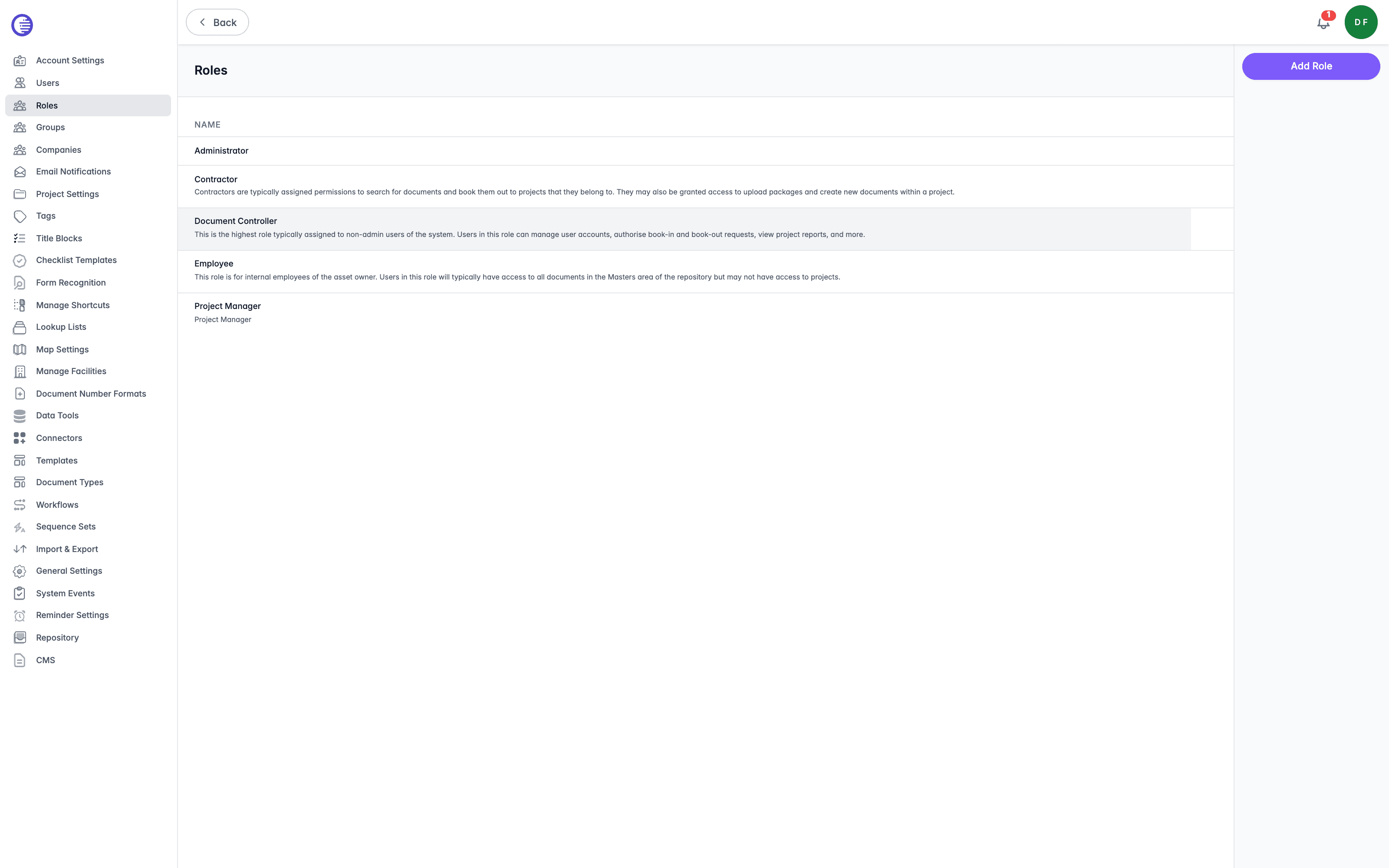
Select a role to open it. A role's page carries three tabs:
| Tab | What it shows |
|---|---|
| Details | The name and a summary of the role. |
| Access Rights | The rights granted to the role. This is where you decide what the role can do, and every right is listed under Available Access Rights below. |
| Permissions | The permissions held by the role. |
To see which groups, and therefore which users, hold a role, open the group instead and check its Roles tab. There is no equivalent list of members on the role's own page.
Deleting a role has no confirmation prompt
Selecting Delete from a role's Options menu removes the role immediately, with no confirmation dialog. Deleting a role affects every group linked to it, so check the group assignments before you delete one.
Available Access Rights
The Access Rights tab lists every right Lunr defines, grouped by the area it governs. Select a right to grant it to the role, and clear it to revoke it.
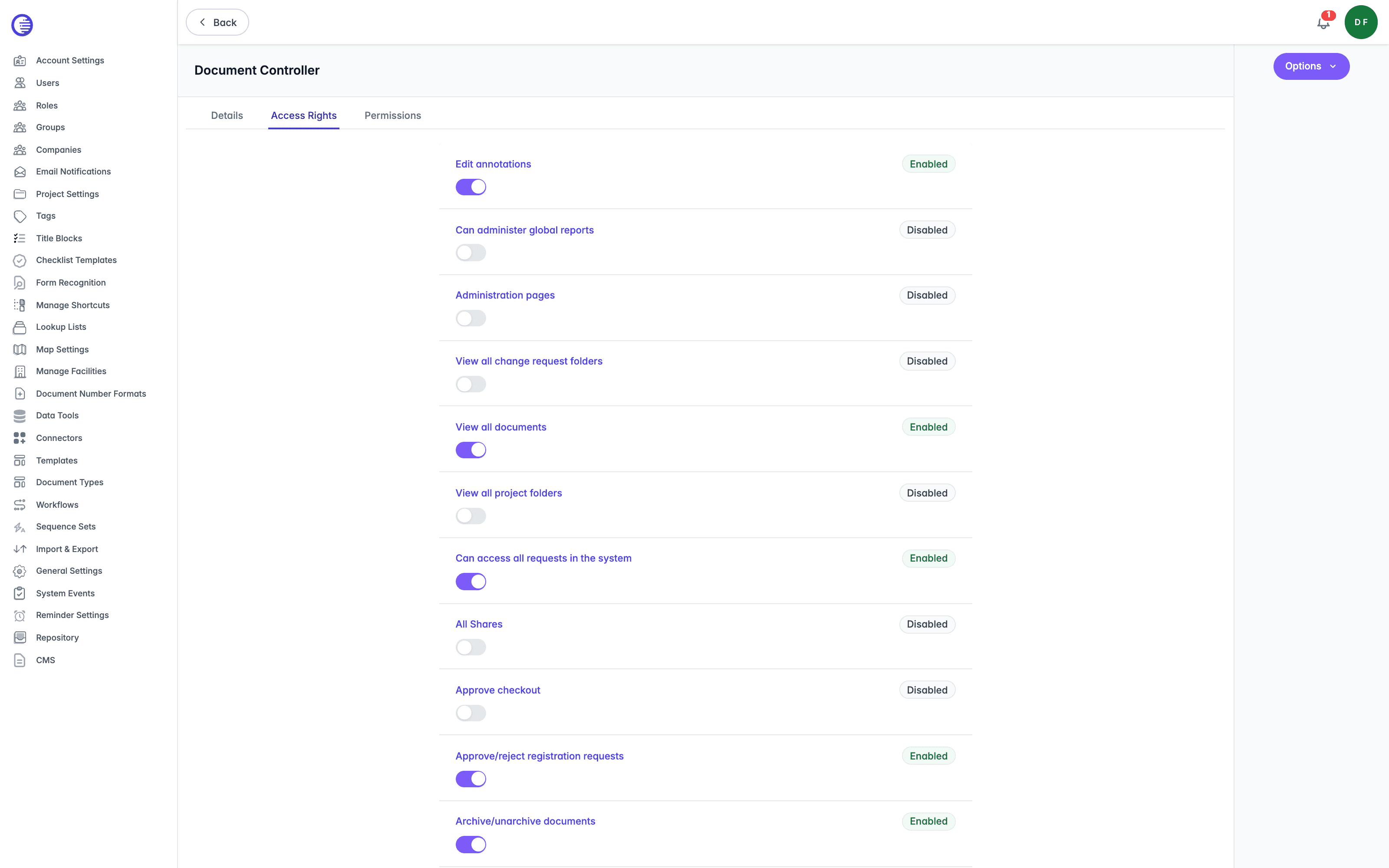
Each right saves immediately when you select or clear it; there is no separate Save button for the tab. If a toggle fails to save, it reverts to its previous state and shows an error.
Rights accumulate rather than compete. A user holds the sum of the rights carried by every role their groups hold, so a right granted anywhere is granted, and removing it means removing it from each role that carries it.
You may not see every right below. A right belonging to a feature your organisation has not enabled does not appear.
Administration and Security
| Access right | What it allows |
|---|---|
| Administration Pages | Open the Administration area and manage organisation configuration. |
| Manage Users | Invite, edit, approve, disable, and manage user accounts. |
| Manage Companies | Create, edit, and delete company records. |
| Company Admin | Administer users and data belonging to their own company. |
| View Principal Audits | View the organisation's audit event log. |
Repositories and Content Configuration
| Access right | What it allows |
|---|---|
| Manage Lookup Lists | Create and edit the lookup lists behind dropdown tags. |
| Manage Drafting Packs | Create and maintain drafting packs. |
| Manage Title Blocks | Configure title-block attribute mappings. |
| Manage Repository Templates | Manage document and import/export template files. |
| Edit Folders | Create and edit folder structures. |
Viewing and Downloading Documents
| Access right | What it allows |
|---|---|
| View Native File | Open a document's native (source) file in the viewer. |
| Download Natives | Download native (source) files. |
| Download Rendition | Download rendered (published) files. |
| Download Restricted Files | Download files flagged as restricted, and see the Restricted Docs tab on a repository. |
| View Deleted Documents | See documents that have been deleted. |
| View Archived Documents | See documents that have been archived. |
| View Stranded Documents | See documents left without a project or folder home. |
| View Suppressed Revisions | See revisions that have been suppressed from a document's version history, and suppress others. |
Creating and Editing Documents
| Access right | What it allows |
|---|---|
| Create Document In UI | Create new documents directly in Lunr. |
| Edit Documents | Edit document details and content. |
| Edit Tags | Edit document tag values. |
| Edit General Tags | Edit general (non-restricted) tag values. |
| Copy Document Tags | Copy tag values from one document to another. |
| Batch Update Tags | Update tags on many documents at once. |
| Edit Location | Change a document's location. |
| Copy Documents | Duplicate documents. |
| Fork Documents | Fork a document into an independent copy. |
| Insert Revision | Insert a revision into a document's history. |
| Restore Version | Restore an earlier version of a document. |
| Delete Documents | Delete documents. |
| Archive Documents | Archive and unarchive documents. |
| Restrict Documents | Flag documents as restricted or remove the flag. |
| Update Rendition | Replace or regenerate a document's rendition. |
| Manual PDF Stamping | Apply PDF stamps manually. |
Master Documents
| Access right | What it allows |
|---|---|
| Edit In Master Documents | Edit documents in the master area. |
| Release As Master | Release a document as a master. |
| Merge To Parent Documents | Merge a document's changes into its parent. |
Review and Workflow
| Access right | What it allows |
|---|---|
| Review Documents | Act as a reviewer on document workflows. |
| Assign To Peer | Reassign their work to a peer. |
| Checkout Documents | Check documents out for editing. |
| Approve Checkout | Approve other users' checkout requests. |
| Add Annotation | Add annotations and redlines in the viewer. |
| Approve Redlines | Approve or reject redline mark-ups. |
| Resolve Comments | Resolve document comment threads. |
| View Configurable Workflow | See configurable-workflow status on documents. |
| Enable Document For Configurable Workflow | Move documents onto the configurable workflow. |
| View Document Queue | View the document processing queue. |
| Manage Document Queue | Manage and reorder the document processing queue. |
| Edit Checklists | Complete and edit the checklists attached to change requests and projects. |
| Verify Checklist Items | Verify checklist items another user has completed. |
| Manage Checklist Templates | Create and edit the checklist templates in the organisation's library. |
Change Requests
| Access right | What it allows |
|---|---|
| Override Change Request Fields | Override locked change request fields. |
| Manage Shared Change Requests | Manage change requests shared with external parties. |
| All Requests | See and manage all requests, not just their own. |
| View Drawing Number Requests | View drawing number requests. |
| Create change requests from collections | Raise a Change Request from a collection. |
Projects and Facilities
| Access right | What it allows |
|---|---|
| Manage Projects | Create, edit, and archive projects. |
| Project Manager | Act as a project manager on assigned projects. |
| External Project Manager | Act as an external (third-party) project manager. |
| External Project Coordinator | Act as an external project coordinator. |
| Assign To Project | Assign documents and people to projects. |
| Projects Root Upload | Upload files at the projects root level. |
| Delete Project Data | Delete data belonging to a project. |
| Create Facilities | Create facilities and portfolio entries. |
Sharing and Collections
| Access right | What it allows |
|---|---|
| All Shares | See and manage every share, not just their own. |
| Manage Shared Collections | Create and manage shared collections. |
| Manage Shared Report Collections | Manage shared report collections. |
RFIs and Reports
| Access right | What it allows |
|---|---|
| Create General RFI | Create general (non-document) RFIs. |
| View Reports | Open and run reports. |
| Administer Reports | Create and configure reports. |
Groups
Group users with similar responsibilities, assign the roles that determine what members can do, control which document repositories a group can access, and manage a group's membership and RFI visibility settings in Lunr.
Companies
Track the vendors and third-party organisations your users belong to, and disable every user from a company at once.